Tally purchase voucher automation: how bill-to-voucher actually works
What a TallyPrime purchase voucher is made of, and how automation builds one end-to-end — extraction, GST validation, the port-9000 XML push, and read-back verification.
Published 14 June 2026
By Himanshu Bhatnagar, Founder, MoneyMistri
A TallyPrime purchase voucher is the accounting record of a buy, and it has a fixed anatomy: a supplier (party) ledger, a purchase ledger, the stock items with quantities and rates, the GST tax ledgers (CGST and SGST/UTGST, or IGST), and the supplier's invoice number and date, all tied to a place of supply. Automating purchase vouchers means building that whole structure from a bill without anyone typing it, and then posting the finished voucher into a running copy of TallyPrime through Tally's own data gateway — and confirming it actually landed. The deceptive part is that the posting is the easy bit. The hard, valuable part is everything before it: getting the structure GST-correct, matching it to the ledgers and units that already exist in your Tally company, and gating it so a wrong voucher never reaches your books. This guide walks the whole pipeline.
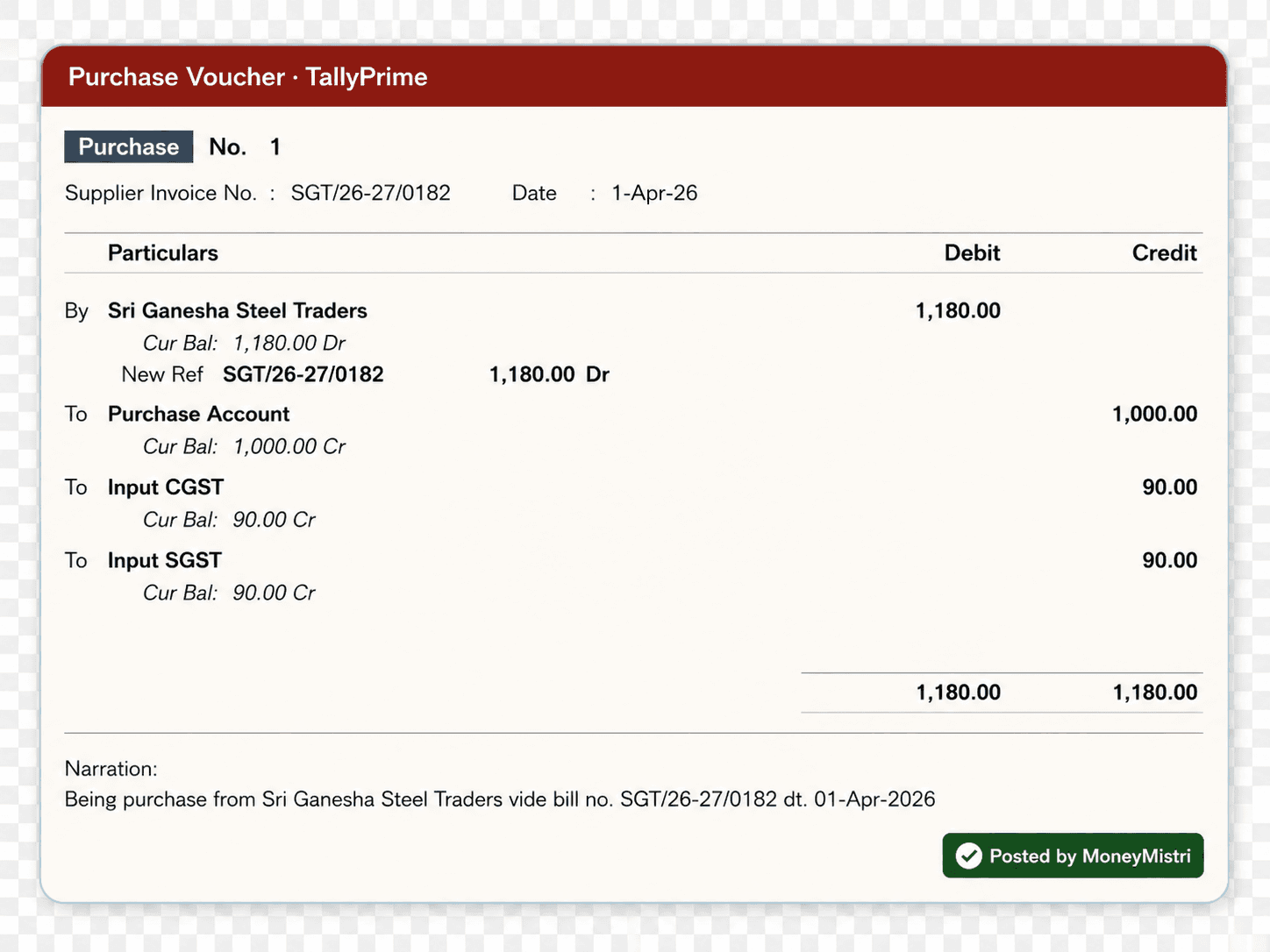
What a purchase voucher is made of
When automation creates a voucher, it has to populate every part a human would in manual F9 entry:
- Party ledger — the supplier, under Sundry Creditors, carrying their GSTIN and state.
- Purchase ledger — a GST-applicable purchase account (often split by rate or nature of purchase).
- Stock items and units — each line's item, quantity, rate, and unit of measure, which must match the item masters in your company.
- Tax ledgers — CGST + SGST/UTGST for a local purchase, IGST for interstate, chosen from the place of supply.
- Reference fields — the supplier invoice number (as printed, up to 16 characters under Rule 46) and date.
Miss or mismatch any of these and Tally either rejects the voucher or accepts a wrong one — which is worse, because it surfaces later as a GSTR-2B mismatch.
How bill-to-voucher automation works, end to end
Every credible automation runs the same five stages:
- Extract. An AI model reads the bill (PDF, scan, or photo) into structured fields — not plain OCR, which only yields text.
- Validate. A deterministic gate checks the result: GSTIN checksum, CGST/SGST-vs-IGST tax mode against place of supply, totals that foot, and duplicate invoice numbers. This runs before a human sees it.
- Review. A person approves the voucher and corrects only the fields the gate flagged — human-in-the-loop, by design.
- Post. A local connector writes the approved voucher into the running TallyPrime instance over its data gateway (below).
- Verify. The connector reads the voucher back from Tally to confirm it was created as intended, and records the result.
The order is the point. Putting the validation gate ahead of review means the human looks only at what genuinely needs a decision, and nothing unchecked reaches Tally.
The connector and the port-9000 gateway
TallyPrime ships with a built-in HTTP server. Enabled from F1 (Help) > Settings > Advanced Configuration, it listens on a local port (default 9000) and accepts data posted as XML in Tally's native structure — external applications can POST a voucher straight to http://<Tally-IP>:9000 and Tally will process it. (Tally is also ODBC-enabled for reads.) That is the integration surface every Tally connector uses: it runs on the same Windows machine or LAN as Tally, transforms a validated voucher into Tally's XML, posts it, and reads it back.
Because the gateway is local, your data never requires Tally to be cloud-hosted, and the connector can confirm success by querying the voucher it just created — a read-back that turns "we sent it" into "Tally has it." This is the model MoneyMistri's connector follows: a validated Purchase voucher is pushed to the local Tally over this gateway and verified by reading it back, so a silent failure can't masquerade as a sync.
Why the validation gate is the real engine
The reason automation is worth more than the typing it saves is that it can refuse to post a wrong voucher. A good gate is deterministic — it doesn't depend on the extraction model being right:
- GSTIN checksum — the supplier's 15-character GSTIN must pass its own check digit before the voucher is allowed through.
- Tax-mode consistency — CGST+SGST on an interstate supply (or IGST on a local one) is a place-of-supply error, and claiming under the wrong head is wrongly availed credit even when the total is right.
- Totals that reconcile — line taxable values plus tax must foot to the invoice total within rounding tolerance.
- Master matching — the supplier ledger, stock items, and units the voucher references have to exist in your Tally company; automation should adopt the live masters, never silently invent or rename them.
Anything that fails a check becomes a review item, not a posted voucher. That is the difference between automation that keeps your books clean and automation that fills them with plausible-looking errors faster than you could by hand.
What automation should not do
A purchase ledger is not a place for blind autopilot. Done responsibly, automation does not post without human approval, does not alter your Tally masters to force a match (it mirrors the units and ledgers Tally already holds), and does not treat "sent" as "done" without the read-back. Those three restraints are what make it safe to point at the ledger your accountant and the tax department both read.
The pipeline, then, is less about Tally and more about discipline: extract with a model that understands GST invoices, validate with checks that don't, let a human approve, post over Tally's gateway, and verify. Get that sequence right and a purchase voucher becomes something you confirm in seconds instead of something you type in minutes.
The TallyPrime gateway behaviour (HTTP server, default port 9000, native-XML posting, ODBC) and voucher structure described here reflect TallyPrime as of mid-2026; verify current behaviour on help.tallysolutions.com before building against it.
See what your books are hiding.
MoneyMistri reads your bills, keeps Tally current, and makes leaks like these visible. Free to start — no card required.
Sources
Primary references for the facts and figures above. External links open in a new tab.
- Record GST purchases in TallyPrime (voucher structure) — Tally SolutionsThe party, purchase, stock, and tax-ledger structure a purchase voucher must populate.
- TallyPrime XML integration (HTTP server, port 9000) — Tally SolutionsTallyPrime's HTTP server (default port 9000) accepts vouchers posted as native-structure XML.
- TallyPrime integration methods and technologies — Tally SolutionsExternal applications POST native-XML vouchers to a running TallyPrime; ODBC is supported for reads.
- TallyIra / Docs by Ira app listing — Tally SolutionsTally lists Docs by Ira as an AI invoice processor that reads supplier invoices and creates draft transactions inside TallyPrime.
- CGST Act, 2017 — Section 16 (input tax credit, tax mode) — GST Council, Government of IndiaWhy the validation gate checks the tax head and GSTIN before a voucher is posted.
Keep reading
How to import purchase invoices into TallyPrime — every method, compared
Three ways to get a GST purchase bill into TallyPrime as a voucher: manual F9 entry, Excel/XML/JSON import, and automated AI extraction with a connector. The exact steps, and when each makes sense.
GST invoice OCR for Tally: why OCR alone fails, and what actually works
Plain OCR reads text; it doesn't understand a GST invoice. Why OCR-only tools break on real bills, how AI extraction differs, and what accuracy to expect before data reaches Tally.
GSTIN validation before Tally entry: the 15-digit checks that save your ITC
A wrong GSTIN sends your supplier's invoice into someone else's GSTR-2B — and your ITC with it. The 15-character structure, the checksum, and how to validate before posting to Tally.